
Clovis, 3 Nov 2026
How automated order intake works for Thai manufacturers
How automated order intake reads LINE, email and PDF orders, checks them against your price list and stock, holds the unclear ones for a person, and writes the sales order into the ERP you already use.
Automated order intake turns a LINE photo, an emailed PDF or a WhatsApp message into a sales order in the ERP you already run. It reads the document, matches the part numbers and prices against your master data, holds anything ambiguous for a person, and writes the clean order through.
The reading is the easy part now. The matching is what decides whether the system saves your team a shift or creates a second inbox to check.
Key Takeaways
- The expensive step is not typing. It is checking each order against customer-specific part numbers, prices and stock, and that check usually sits with one person who knows the customer.
- A workable system does four things: extract the line items, match them to master data, route exceptions to a person, write to the ERP. Remove the exception queue and it fails quietly.
- Start with one channel and one repeat customer segment. The messy handwritten walk-in order is the last thing to automate, not the first.
Why order intake breaks before anything else
Most Thai manufacturers did not choose to take orders on five channels. The channels arrived. A customer emails a purchase order as a PDF. A dealer sends a photo of a handwritten order on LINE. Another sends part numbers in a WhatsApp message. A walk-in hands over a printed PO.
Each channel is convenient for the buyer and expensive for the seller, because somebody has to read the message, understand it, check it against the price list and stock, and type it into the ERP.
This is not a niche workflow. Thailand had 3.26 million SME operators in 2024, 99.5% of all operators, employing 13.4 million people or 68.8% of total employment (OSMEP, reported by Thairath, 15 December 2025). That is the market this problem lives in: businesses large enough to run an ERP, and small enough that the person keying the order also answers the phone.
LINE is where a large share of those documents land. Around 54 million people in Thailand use LINE, roughly 80% of the population, and businesses run about 6 million LINE Official Accounts (LY Corporation, 5 December 2025). If your customers are on LINE, your order desk is on LINE.
The typing is not the expensive part. The checking is. And the checking is where the errors come from, because it happens at 6pm on a Friday, by the person who knows that this customer numbers the part differently from everyone else.
What automated order intake actually does
The name sounds bigger than the job. There are five steps, and only one of them needs a person.
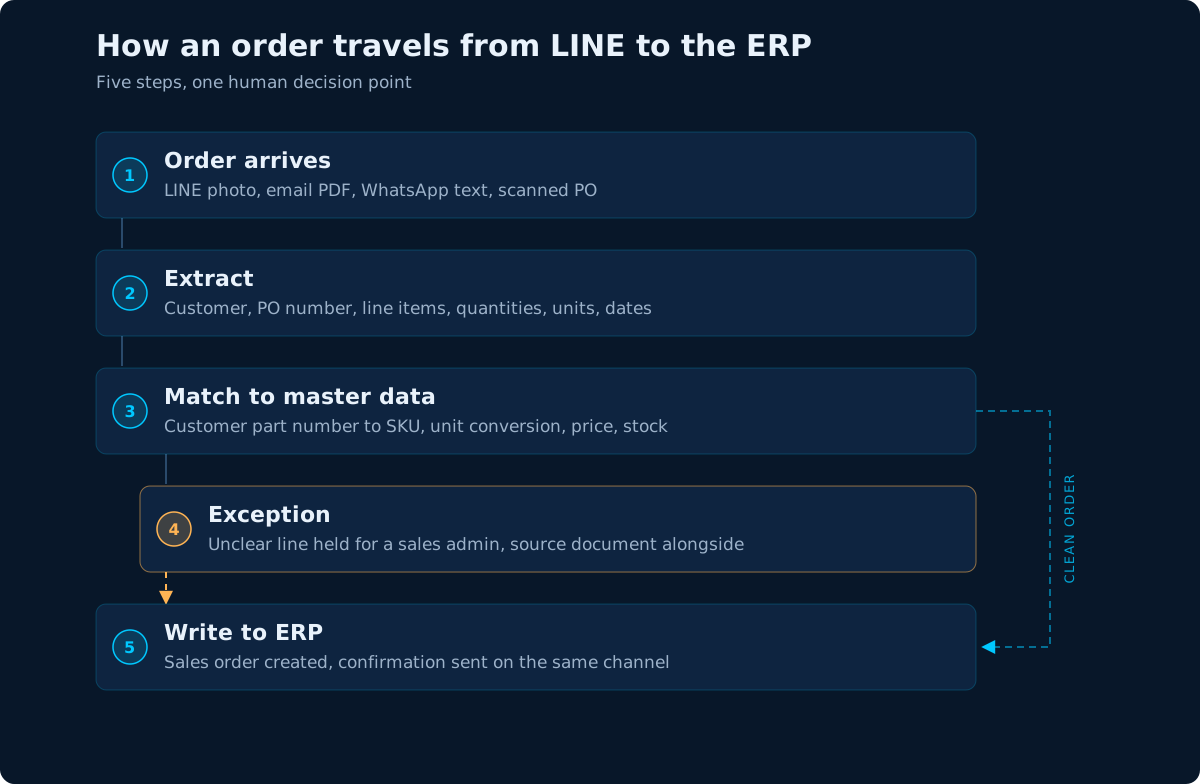 Only the exception step should need a person. If steps 2 to 5 need one too, the system is a viewer, not an automation.
1. Capture. Connect the channels the orders already arrive on: a shared inbox for PDFs, a LINE Official Account webhook, a WhatsApp export, a folder for scanned POs. Nothing changes for the customer, which is the point.
2. Extract. Pull out the fields the ERP needs: customer, PO number, order date, delivery date, line items, quantities, units, prices. Modern extraction handles a photo, a scanned PDF and a typed email attachment. The output should be structured data with the source location attached, so a person can see which part of the document a number came from.
3. Match. This is the step that separates a demo from a system. Every line has to be matched against your master data: the customer's part number to your SKU, the unit they wrote to the unit you sell, the price they expect to the price you are willing to accept, the stock you have now.
4. Decide. Inside your tolerances, the order posts automatically. Outside them, it goes to an exception queue with the original document beside the extracted fields, so a sales admin can fix it in seconds rather than re-read the whole order.
5. Write and confirm. Create the sales order in the ERP through its API or a validated import, then send the confirmation back on the channel the customer used. That last step matters more than it sounds: a customer who ordered on LINE expects a reply on LINE, not an email they will not read.
Where the errors actually come from
Human-error research puts accuracy for mechanical actions such as typing at 99.5% to 99.8%, which is a 0.2% to 0.5% error rate on the keystrokes alone (Raymond R. Panko, "Thinking is Bad," EuSpRIG 2007, Figure 2). That is the best case: it covers the typing, not reading the PO, choosing the customer, or converting a unit.
A desk handling a few thousand order lines a month is working with thousands of chances to transpose a digit or pick the wrong unit. Most mistakes are caught before dispatch. The expensive ones are the quiet errors that survive to the invoice.
| Failure | What happens manually | What the system should do |
|---|---|---|
| Ambiguous part number | Someone calls the customer and waits | Keep a customer-specific mapping table; hold the line and show the closest matches |
| Unit mismatch (pieces vs boxes) | Mental arithmetic, sometimes wrong | Store a conversion rule per customer and per SKU; flag when the result is not a whole number |
| Missing delivery date | The admin guesses, or defaults to ASAP | Hold the order, or propose the standard lead time and ask the customer to confirm |
| Duplicate PO | Someone remembers seeing it | Deduplicate on customer plus PO number before creating anything |
| Price mismatch | The old price gets honored by accident | Check against the contract price table and route the difference for approval |
None of these are extraction problems. They are data problems, and they are the reason a generic document reader is not an order intake system.
The exception path is the product
Every vendor demo shows a clean PDF. Your inbox is not clean. The question to ask is not "what is your accuracy?" but "what happens to the order you get wrong?"
A system that silently guesses is worse than a manual process, because the error is now in the ERP with a confirmation sent. The design has to make the uncertain cases visible:
- Never auto-correct silently. If the system changes a unit or a part number, it shows the change and the evidence for it.
- One queue, not five. Exceptions from every channel land in the same list, sorted by order value or promised delivery date.
- Show the source. The extracted field sits next to the part of the document it came from, so checking takes a glance rather than a re-read.
- Measure the exception rate. If a third of orders need a person, you have added a screen, not removed work. The target is a falling exception rate as the mapping tables learn your customers.
That last point is the difference between a project and a product. The mapping table is the asset. Every exception a person resolves should make the next identical order automatic.
What to measure before you automate
You cannot prove a gain without a baseline. For two weeks, before any build, record:
- minutes from order arrival to ERP entry, by channel
- errors per 100 orders, by type (part number, quantity, unit, price, date)
- the share of orders that needed a phone call or a LINE message to clarify
- order-to-confirmation time, which is what the customer actually feels
Those four numbers tell you whether the problem is volume, variation or a specific customer. They also stop the project from being judged on how impressive the demo looked.
What to automate first
The rule is volume times variation, divided by how hard the exceptions are. In practice, that usually means starting with emailed PDFs from repeat dealers: high volume, familiar formats, a known part-number mapping. LINE photos from regular customers come second. The handwritten walk-in order comes last, because it combines bad input quality with low volume.
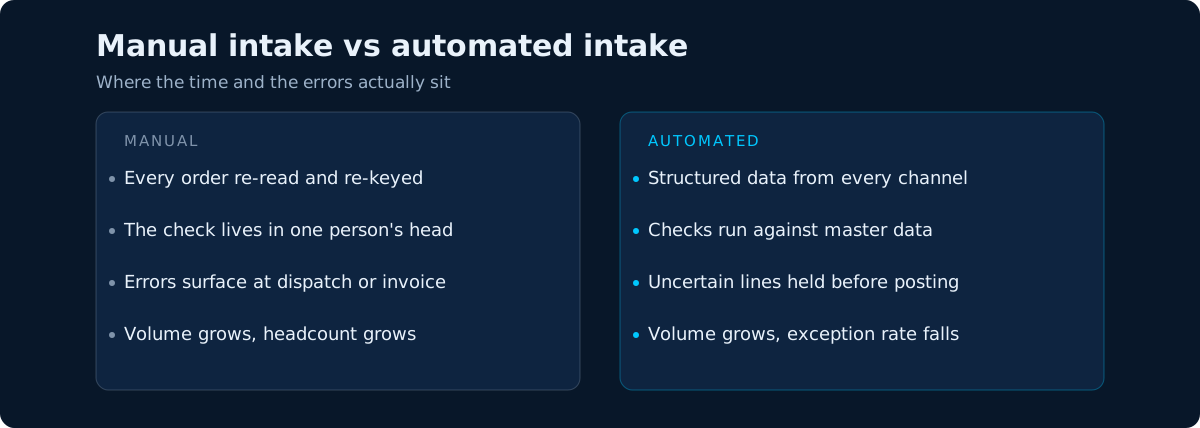 The gain is not faster typing. It is that the check happens once, against master data, instead of in someone's head.
One more decision worth making early: who owns the mapping table. If it belongs to the vendor, every new customer part number becomes a support ticket. If it belongs to your sales admin, with a simple screen to add an alias, the system gets better every week without a project.
Conclusion
Automated order intake is not a document reader bolted onto an inbox. It is a matching system with a human exception path, wired into the ERP you already run. The extraction is commoditized; the mapping table and the exception queue are where the work and the value sit.
If you would rather see how this fits a plant, start with our manufacturing page or the automation service.
I hope this was helpful. If you want to test this on one of your own workflows, book a call for a free 30-min Workflow ROI Blueprint — bring the repetitive task that costs your team the most hours every week — or email me at clovis@n2olabs.ai.
Thank you,
Clovis
Sources
- LY Corporation, "How LINE Has Become Thailand's Everyday Life", 5 December 2025 — 54 million users, 6 million LINE Official Accounts.
- OSMEP data reported by Thairath, "Technology Is Not an Option but a Survival Strategy", 15 December 2025 — 3,255,957 SME operators, 13.4 million employees.
- Raymond R. Panko, "Thinking is Bad: Implications of Human Error Research for Spreadsheet Research and Practice," EuSpRIG 2007, Figure 2 — 99.5–99.8% accuracy for mechanical actions such as typing.