Clovis, 13 Nov 2026
AI agents vs RPA: what fits a Thai factory in 2026
RPA and AI agents fail in different places. A practical comparison for Thai manufacturers, with 2026 license prices and the hybrid order path that keeps a person in control.
RPA follows a fixed script. An AI agent reads the document and decides what to do next. For a Thai factory, the useful question is not which one wins. It is which part of the order desk each one should own.
The terms get mixed because vendors now sell both. UiPath calls its platform agentic automation and lists robots and agents in the same product (UiPath, retrieved 13 November 2026). The label says what the vendor hopes you will buy, not what the work needs.
The split I use with manufacturers is simple. An agent reads the messy input. Deterministic rules check the money. A person approves anything that does not fit. Then a script writes to the ERP.
Key Takeaways
- RPA replays a known path. An AI agent chooses its next step from the document in front of it.
- Entry prices depend on whether you pay per person or per bot, and the unattended tier costs many times the attended one.
- RPA fails when the screen or template changes. An agent fails when it misreads a line and nobody checks.
- For Thai order desks, the reliable pattern is agent reads, rules decide, person approves, script writes.
RPA and AI agents are not the same thing
A robotic process automation bot replays a path someone built in advance. The tool captures the clicks and keystrokes once; the bot repeats them on demand. Microsoft's documentation is plain about the boundary: desktop flows are for "simple or complex rule-based tasks," and they interact with a machine through "application UI elements, images, or coordinates" (Microsoft Learn, 24 August 2026).
That design is excellent when the path never changes. It is also why the bot has no idea what it is doing. If the ERP moves the Save button, or a customer sends a new PDF layout, the recorded path misses. The bot stops, or it types into the wrong field.
An AI agent works from the document, not from a recording. Anthropic draws the line this way: workflows are "systems where LLMs and tools are orchestrated through predefined code paths," while agents are "systems where LLMs dynamically direct their own processes and tool usage" (Anthropic, 19 December 2024). That flexibility has a price. The same post recommends the simplest solution and warns that agentic systems "often trade latency and cost for better task performance." It adds that this "might mean not building agentic systems at all."
So the label is not the decision. The work is.
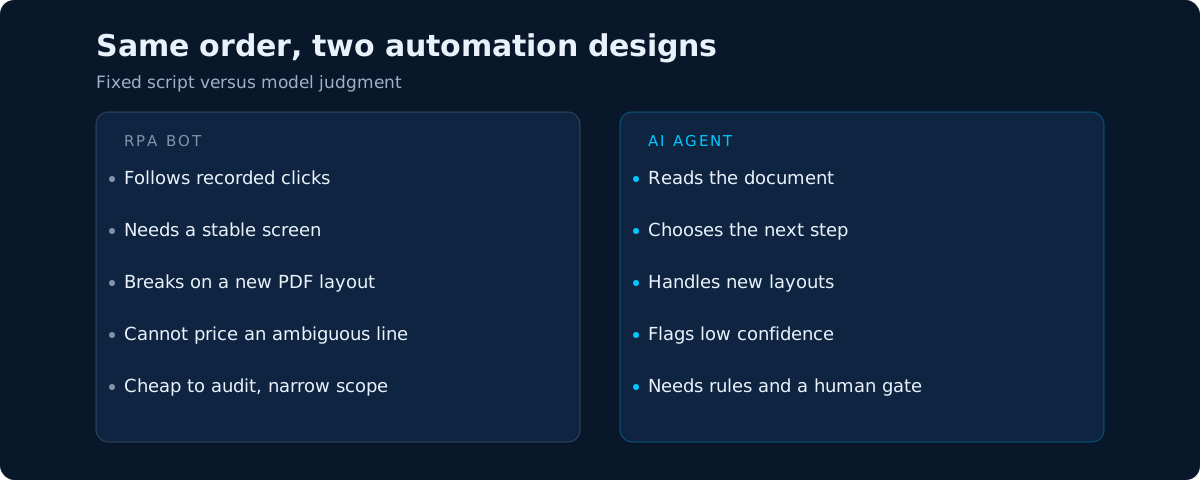 The difference is who chooses the next step. It is also why the two fail in different places.
What each option costs in 2026
The published prices are low enough that the license alone will not decide this. What differs is what you pay per person, per bot, and per exception.
| Option | Published list price | What it covers | What to watch |
|---|---|---|---|
| UiPath Community | $0 | Build, explore and automate; Maestro, Studio and SDKs | Community support only; no enterprise governance listed |
| UiPath Basic | From $25/month | Basic personal automations, limited users and robots, EU hosting | Agents and governance sit in higher tiers |
| UiPath Standard and Enterprise | Quote only | Agents, orchestration, enterprise governance | Price depends on scale and region |
| Power Automate Premium | $15/user/month, paid yearly | Cloud flows, attended desktop flows, process mining | Priced per person |
| Power Automate Process | $150/bot/month, paid yearly | Unattended automation | Priced per bot |
| Power Automate Hosted Process | $215/bot/month, paid yearly | Unattended automation on a Microsoft-hosted machine | Priced per bot, infrastructure included |
Prices are from the two vendor pages linked above, both retrieved 13 November 2026. UiPath lists Standard and Enterprise as "contact sales," so there is no public number to compare (UiPath, retrieved 13 November 2026). Microsoft publishes prices for Premium, Process and Hosted Process, with Premium aimed at attended work and Process at unattended work (Microsoft, retrieved 13 November 2026).
The license is the smallest line in the project. Integration, exception handling, monitoring and the person who owns the workflow usually cost more than the subscription. A bot at $150 a month that needs a long integration and a part-time maintainer is not a $150 decision.
Where an RPA bot breaks in a Thai factory office
A customer sends a LINE photo of a handwritten purchase order. Another sends a PDF with Thai text and a Buddhist-era date. A third sends a spreadsheet whose columns do not match last month's.
An RPA bot can handle any one of those if someone builds and maintains a rule for that exact format. The cost is not the first rule. It is the twentieth customer, the new template, and the staff member who has to notice the bot failed before the order ships.
This is the maintenance trap. When formats change monthly, you are not automating the order. You are automating the maintenance of the order.
The problem repeats inside the ERP. A bot that clicks through SAP Business One or Odoo is only as stable as the screen it recorded. An upgrade, a new field, a changed tab order, and the path needs rework.
A fixed template with high volume is still a good RPA case: one customer, one layout, no exceptions. Record it and leave it alone. The mistake is pointing that same tool at the messy front door of the order desk.
Where an AI agent still needs a person
An agent reads the document and proposes the fields: customer, part numbers, quantities, delivery date, price. It is good at the part a rule cannot do. It is not a source of truth.
A scanned quantity can be read as 1 instead of 7. A customer's part number can map to the wrong internal SKU. A Buddhist-era delivery date can land in the wrong century if nobody converts it. The confidence score is a signal, not a guarantee.
So the agent needs a fence around it:
- Extract into a fixed schema with required fields, not free text.
- Check price, stock and customer terms against the ERP, not against the model's memory.
- Recompute totals and the VAT line with a deterministic rule.
- Route low confidence and failed checks to a person with the source document attached.
- Keep the source file, the extracted fields, the rule result and the approver in one log.
That log answers a customer dispute six weeks later and shows what the system did with personal data.
The design that usually wins: agent reads, rules decide, person approves
The reliable pattern is a chain, not a choice. The agent handles the variable part. The rules handle the arithmetic. The person handles judgment. The script handles the write.
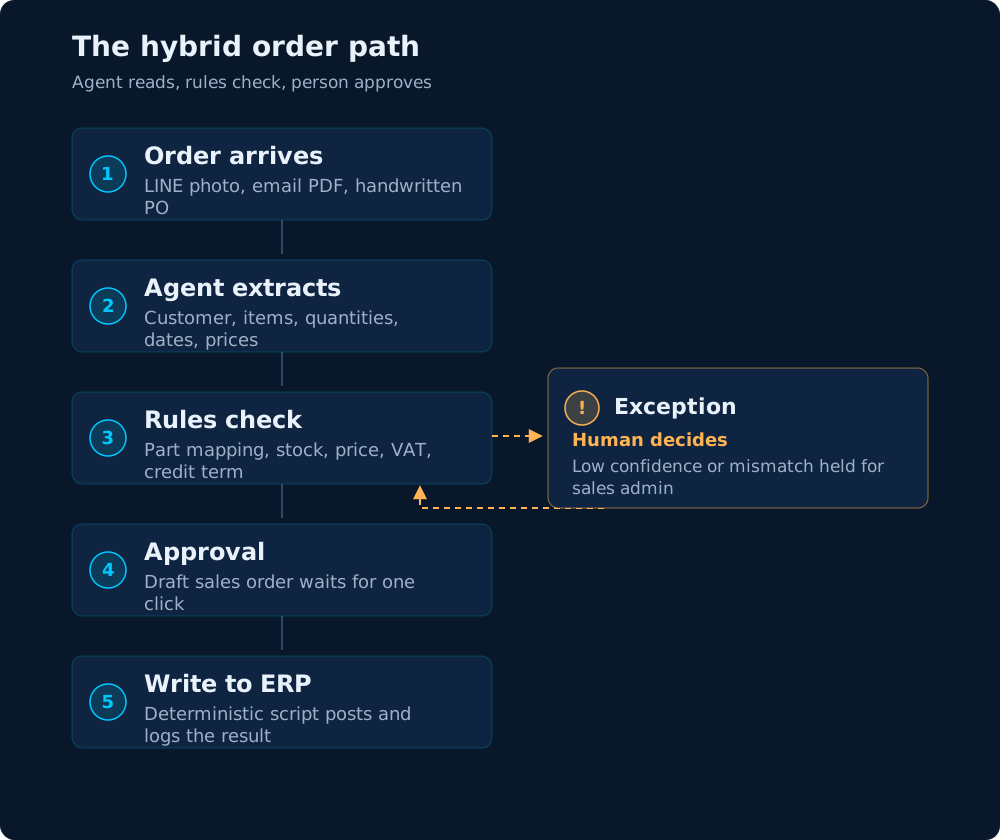 The clean path skips the exception. The agent never posts to the ERP on its own.
- Order arrives. A LINE photo, an email PDF or a handwritten PO lands in one inbox.
- Agent extracts. The model returns the customer, line items, quantities and dates in a fixed schema.
- Rules check. A script matches part numbers, confirms stock, applies the price list and recomputes the totals. Anything low-confidence or mismatched branches to a sales admin with the original document and rejoins at approval.
- Approval. A person approves the draft sales order.
- Write to ERP. A deterministic script creates the sales order and logs the result.
The important detail is step five. The model never writes to the ERP. The write is a script with a known input, so it can be tested, replayed and audited. The agent is the front door, not the whole building.
This is the split we build at N2o for order intake from LINE, email and PDF, and the same logic behind our AI agents and automation work.
What to pilot first
Do not start with a platform decision. Start with one workflow and one measure.
The four-work test
| The work | Best fit | Why |
|---|---|---|
| Fixed template, stable screen, high volume | RPA or a plain script | Cheapest to audit |
| Varying documents, rule-bound checks | Agent plus rules | Reading is the only variable |
| Ambiguous commercial decision | Agent prepares, person decides | Judgment stays human |
| A handful of orders a day | Manual plus a template | Automation costs more than it saves |
If the input format is stable and the rule is complete, you do not need a model. If the input varies but the decision is rule-bound, an agent earns its cost. If the decision needs judgment, keep the person and let the agent prepare the file.
Scope the first pilot
Pick one product family, one customer group and one inbox. Connect the agent to a copy of the price list, not the live ERP, until extraction is stable. Keep a person on approval from day one. Measure minutes per order, the share of orders a person touches, and errors per hundred orders before and after.
Thailand's national survey makes the measurement case. NECTEC surveyed 574 organizations and found 53.7% using AI, with manufacturing the highest-use sector. Among those users, 86.4% could not say what result they got, and 26.0% of them had started with agentic AI (NECTEC, 3 September 2026). The tool is not the hard part. Knowing whether it worked is.
That is why the pilot needs a baseline first. Our guide to measuring AI ROI on one workflow uses the same rule: one KPI, one guardrail, two weeks of counting before you buy.
Conclusion
RPA and AI agents are different tools with different failure modes. RPA is cheaper and easier to audit when the path is fixed. An agent is better when the document is messy and the next step depends on what it says.
The Thai order desks we see with mixed channels need both, with a person at the exception. Let the agent read, let the rules check the money, and let the script write to the ERP only after someone approves.
Start with the order type that costs you the most rework, not the demo that looks best. The manufacturing page lists the workflows we see most often.
I hope this was helpful. If you want to test this on one of your own workflows, book a call for a free 30-min Workflow ROI Blueprint — bring the repetitive task that costs your team the most hours every week — or email me at clovis@n2olabs.ai.
Thank you,
Clovis
Sources
- Anthropic, Building effective agents, 19 December 2024 — definitions of workflows and agents, and guidance to start with the simplest solution.
- Microsoft Learn, Introduction to desktop flows, last updated 24 August 2026 — desktop flows as RPA for rule-based tasks, interacting through UI elements, images or coordinates.
- UiPath, Plans and Pricing, retrieved 13 November 2026 — Community and Basic plans, the $25 monthly starting price, and quote-only Standard and Enterprise tiers.
- Microsoft, Power Automate pricing, retrieved 13 November 2026 — Premium at $15 per user per month, Process at $150 per bot per month, Hosted Process at $215 per bot per month.
- NECTEC, AI Readiness 2026 survey, 3 September 2026 (in Thai) — 574 organizations, 53.7% AI use, 26.0% agentic AI adoption among users, 86.4% unable to state results.